TRUNK-BASED DEVELOPMENT
Practical Git guide
Short branches · Frequent integration · Controlled releases
The idea in 30 seconds
TBD keeps
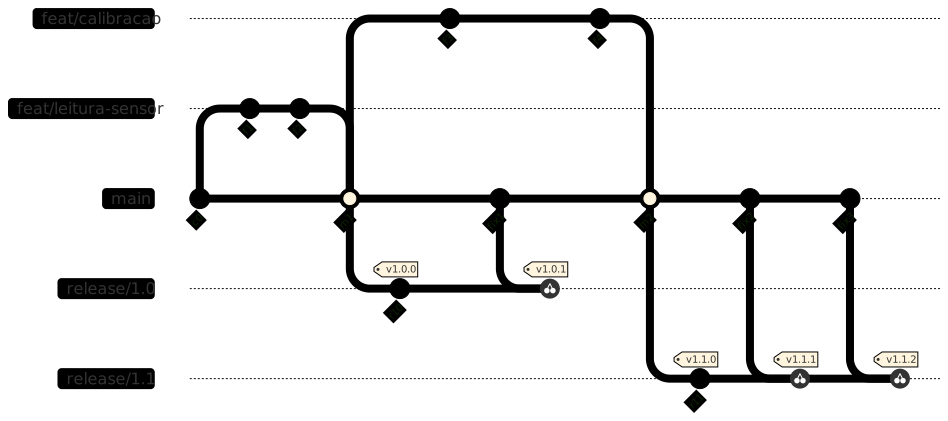
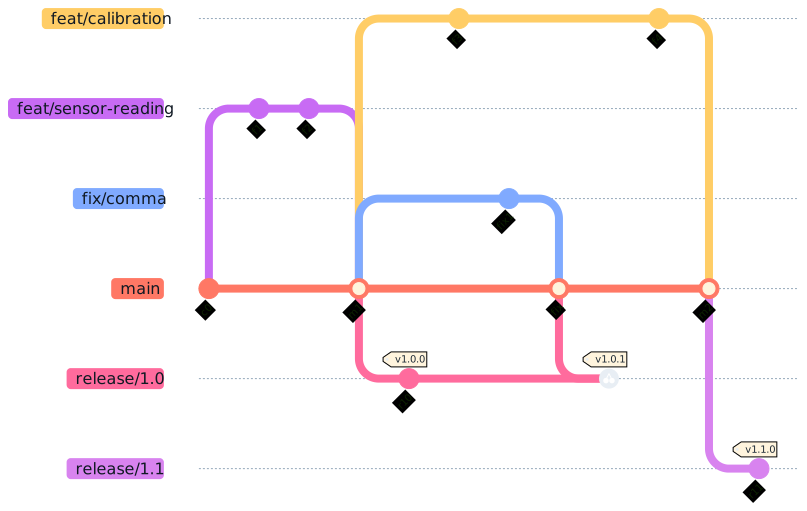
mainas the integration line, with small deliveries and short-lived branches. CI (Continuous Integration) builds, tests, and analyzes the code on every push or PR/MR. Release branches are optional and only stabilize versions whilemainmoves forward.
01 · Clone a repository
This is the main flow when the project already exists on a Git server. The URL can use SSH or HTTPS.
git clone <REMOTE-URL>
cd repo-name
git switch main
git pull --ff-only origin main
origin is the conventional remote name. --ff-only avoids an automatic merge and fails if histories diverge.
02 · Create a short branch
Use a branch for a small change that needs review or CI before reaching the trunk. Finish in hours or a few days.
Name the branch after the change: feat/, fix/, docs/, test/, refactor/, build/, or chore/. The glossary explains these prefixes.
git switch -c feat/sensor-reading
git status
git diff -- src/sensor.c include/sensor.h
git add src/sensor.c include/sensor.h
git rm src/obsolete.c
git commit -m "feat: read sensor over I2C"
Add files explicitly; git rm removes a file from the working tree and the index.
To fix the last commit before publishing:
git add include/sensor.h
git commit --amend --no-edit
Good practice
Even with unfinished work, commit at the end of the day so progress is not lost. If that commit is not published yet, continue the next day and use
--amendto update it; this changes its SHA. After publishing, prefer a new commit over rewriting shared history.
Publish the branch to open a PR/MR. Integration into main happens later on the remote platform:
git push -u origin feat/sensor-reading03 · Publish and integrate a PR/MR
A PR (GitHub) or MR (GitLab) is a review request on the hosting platform; opening or approving it does not integrate the code. After CI and any required approval, merge it. PR/MR is optional in TBD; keep branches and reviews short.
GitHub · Install gh
gh pr create --base main --fill
# after approval
gh pr merge --squash --delete-branch
GitLab · Install glab
glab mr create --fill
# after approval
glab mr merge --squash --remove-source-branch
Codeberg / Gitea · Install tea
tea pulls create \
  --base main \
  --head feat/example \
  --title "feat: add example"
# after approval, merge in the web interface
Local merge (integrates in this clone, without a PR/MR):
git switch main
git merge --no-ff feat/example
This changes only the local repository; the remote server does not receive this merge.
Update × integrate
--ff-only  A---B---S  main
--no-ff   A---B---------M  main
               \       /
                C-----D    feat/example
pull --ff-onlyupdatesmain;Mmarks the--no-ffmerge.
04 · Clean up after PR/MR
Local merge: git branch -d. After a remote squash, confirm the PR/MR and use git branch -D. The platform removes the remote branch.
git switch main
git pull --ff-only
git branch -d feat/sensor-reading
Marcio
Bulla
From beginner to beginner
05 · Release, tag, and intermediate update
A release branch is optional: create it near launch, only for stabilization. The trunk keeps receiving features; the release gets no new functionality.
git switch main
git pull --ff-only origin main
git switch -c release/1.0
git push -u origin release/1.0
git tag -a v1.0.0 -m "Release 1.0.0"
git push origin v1.0.0
The tag must point to the exact approved commit. For a 1.0.1 update born on the trunk, locate the SHA, carry the fix to the release, and then create the tag.
git switch main
git log --oneline --decorate -10
# fix, test, and commit
git switch release/1.0
git cherry-pick <SHA>
git tag -a v1.0.1 -m "Release 1.0.1"
git push origin release/1.0 v1.0.1
Controlled propagation
cherry-pickcreates another commit, normally with another SHA. On conflict, resolve it, usegit addandgit cherry-pick --continue; cancel withgit cherry-pick --abort.
06 · Read the history
Use the log to locate the approved commit, understand the topology, and compare trunk with release.
git log --oneline --decorate --graph --all
git show <SHA>
git log main..release/1.0
git diff main..release/1.0
07 · Recover after a problem
To recover an old commit without rewriting the shared trunk, locate it and create a recovery branch.
git reflog
git switch -c recovery/old-state <SHA>
git restore --source=<SHA> -- src/sensor.c
git diff --stat
git add src/sensor.c
git commit -m "fix: restore stable state"
git push -u origin recovery/old-state
If the goal is to undo an already published commit, prefer revert:
git switch main
git pull --ff-only origin main
git revert <SHA>
git push origin main
Caution
git revertcreates a new commit and preserves history.git reset --hardcan discard local changes and must not rewrite shared history. Preserve work withgit stash push -m "wip".
EXTRA · Create a local repository
Use this flow when the project is not a Git repository yet. Then publish it to the remote.
git init
git switch -c main
git add README.md
git commit -m "chore: initialize repository"
git remote add origin <REMOTE-URL>
git push -u origin main
Quick command glossary
Prefixes (branch: / · commit: :): feat feature · fix bug fix · docs documentation · test tests · refactor structure without behavior change · build build/dependencies · chore maintenance and organization.
git clone — copies a remote repository.
git init — initializes a local Git repository.
git remote — manages remote repository URLs.
git switch — changes branch; -c creates one.
git status — shows file state.
git diff — compares uncommitted changes.
git add — stages changes; creates no commit.
git rm — removes and stages a file removal.
git merge — integrates another branch’s history.
git commit — records staged work in history.
git log — lists commits; --oneline summarizes.
git show — displays a commit and its changes.
git pull — fetches and integrates remote updates.
git push — publishes local commits to the remote.
git fetch — fetches references without changing your branch.
git tag — marks a commit with a version.
git cherry-pick — copies a commit to another branch.
git revert / restore / stash — undoes, recovers, or stores work.
Marcio
Bulla
From beginner to beginner